Add A Network Printer
Adding a Network Printer
1. Click on your Windows Start button and immediately type \\omuprint and hit Enter.

2. A window should pop up showing all available network printers.

3. Double-click the printer(s) you need. The drivers will install and you should be able to print immediately in Windows.
- NOTE: If you need this printer in GP, you will have to sign out and back into GP for it to be visible.
-
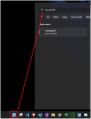
Start Button and Command
-
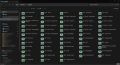
List of Available Network Printers